
Direct deposit
Direct deposit is an electronic transfer of funds from an organization like your employer, a retirement plan or the Social Security Administration, paid directly to your Regions account. Setting up direct deposit can be done conveniently through Direct Deposit Switcher in the mobile app or Online Banking.1
Qualifying customers can get funds up to two days early through Early Pay.2
Learn how to use Direct Deposit Switcher to switch your direct deposit to Regions
Electronically set up direct deposit in a few simple steps
Step 1: Log in and navigate to manage direct deposits
In the mobile app, tap Pay & transfer from the bottom navigation and then tap Manage direct deposits.
In Online Banking, click Transfers from the top navigation and then click Manage direct deposits.
Once you’re ready to switch your direct deposit to your Regions account, select Allow and continue.
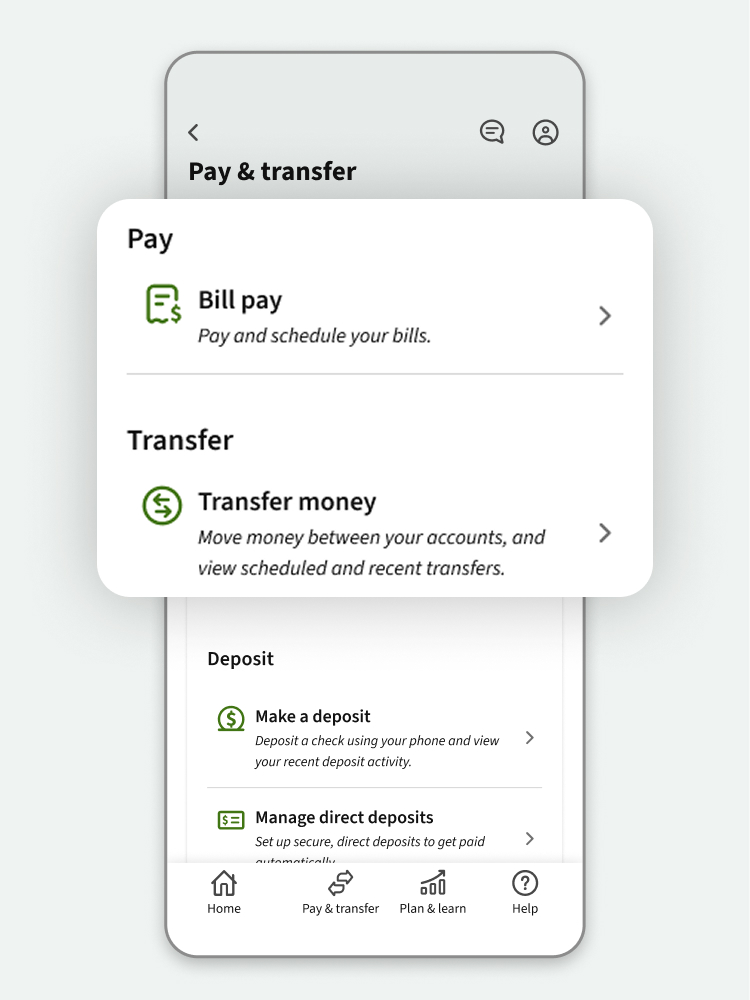
Step 2: Select your account and choose your employer
Select the account you want your direct deposit to be deposited to. On the next screen, choose your employer and log in using your work credentials.
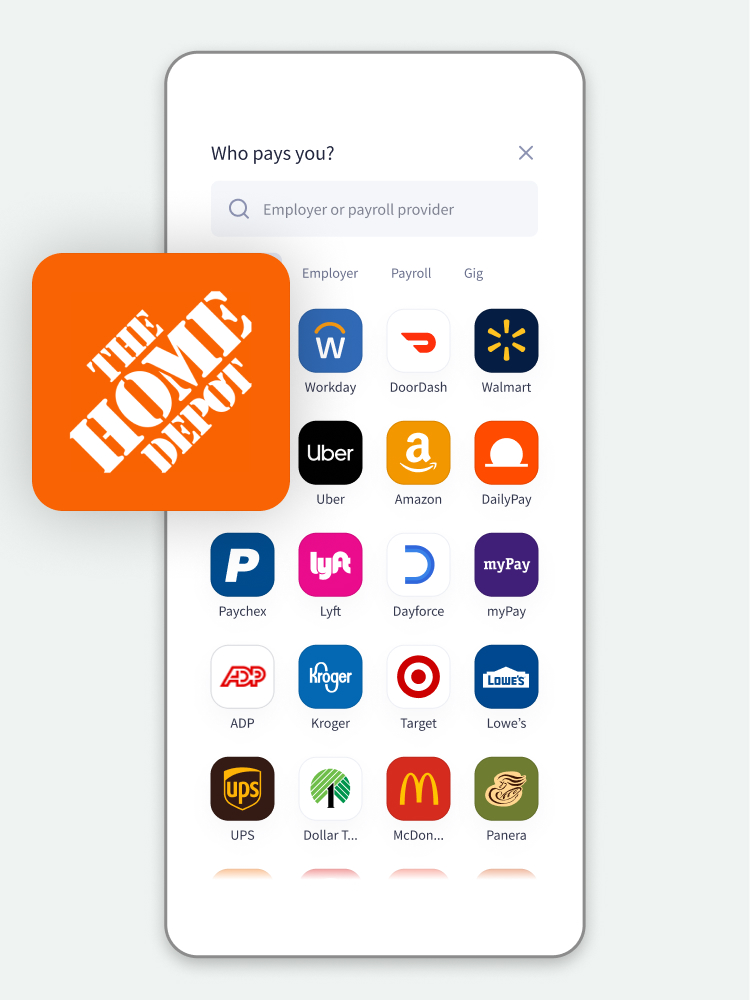
Step 3: Confirm your direct deposit set up and deposit amount
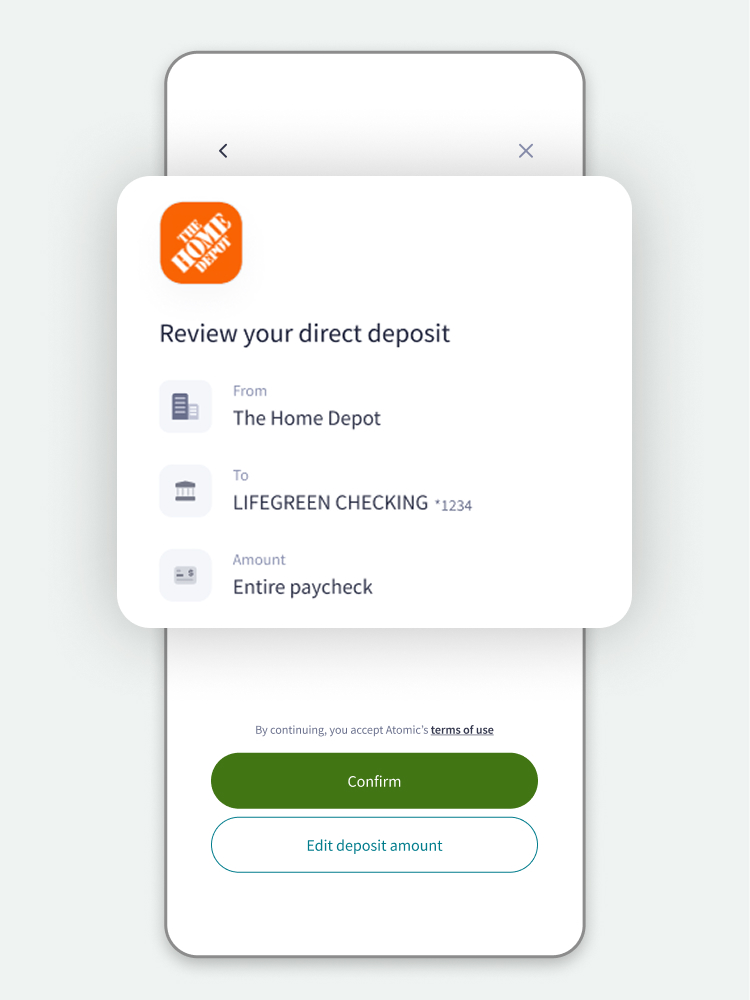
Check that the information is accurate for your employer, Social Security or retirement plan and verify the account you have chosen.
Next, determine if you want a portion of your paycheck or the entire paycheck directly deposited into your account. Once your details are set, tap Confirm. Your direct deposit is confirmed. Updates to your direct deposit may take up to one to two pay cycles to take effect based on your employer or payroll provider.
Direct deposit enrollment forms
If your employer is not eligible for electronic enrollment in direct deposit, use the form provided to set up direct deposit.

You could get paid up to two days faster with Early Pay
Regions customers could get access to qualifying payroll funds from participating employers or federal and state government payments up to two days early with Early Pay.2
No need to enroll and there's no additional cost — it’s automatic when you have qualifying direct deposits to your Regions account or prepaid Regions Now Card®.
Download the Regions Mobile app
Bank on the go from your mobile device or tablet in English or Spanish.3 It's easy and safe. Just download the Regions Mobile app and enroll in Online Banking.1 With a tap or a touch, you can move money, pay bills, deposit checks and monitor accounts.
Scan the code with your mobile device camera to download the app or visit regions.com/download.


Direct deposit details
To identify your checking, savings, or money market account number within Online Banking, select the account from the Account Overview and click View More Details to expand the Account Details area. You will see your masked account number and can then select to show your full account number.
In the Regions Mobile app, select an account and tap View account & routing numbers.
Regions routing numbers are as follows:
| State | Routing/Transit Number |
|---|---|
| Alabama | 062000019 |
| Arkansas | 082000109 |
| Florida | 063104668 |
| Georgia | 061101375 |
| Illinois | 071122661 |
| Indiana | 074014213 |
| Iowa | 073900438 |
| Kentucky | 083901744 |
| Louisiana | 065403626 |
| Mississippi | 065305436 |
| Missouri | 081001387 |
| North Carolina | 053012029 |
| South Carolina | 053201814 |
| Tennessee | 064000017 |
| Texas | 111900785 |
| Virginia | 051009296 |
Customers should use the following address when setting up direct deposit to their Regions account:
2090 Parkway Office Circle, Hoover, AL 35244
Funds from direct deposits, cash deposits or wire transfers are generally available the same day they are deposited to your account. In most cases, funds from checks you deposit on a business day (business days exclude Saturday, Sunday and federal holidays) are available to you by the next business day. However, in some cases, funds may take longer before they are available for your use (up to 7 business days). If there is a hold on your deposit, we will notify you of when funds will be available. Please see the Funds Availability Policy in the Regions Bank Deposit Agreement for complete details.
You can set up direct deposit through a payroll connectivity tool like Regions’ Direct Deposit Switcher in the mobile app or Online Banking. Digitally access your employer’s payroll system and make the switch.
Or you can provide your employer with your Regions routing and account number. Fill out a direct deposit authorization form and attach a voided check.
Smart solutions to help you succeed

Plan for the future
Build plan to reach goals
Work with a banker to build a Regions Greenprint® personalized plan to help you achieve your goals.

Access funds
Build credit for the future
Subscribe to Self,4 a service that could help build your credit history by reporting payments you already make. Sign up for Rent Reporting at no cost to improve your access to financial opportunities in the future.

Protect assets
Control your cards
Set up LockIt® card controls5 to customize how your debit card, credit card and prepaid Now Card® can be used.